
Here I want to compare both methods. In this example will use few git functions.
Merging
Merge graph that looks below. To incorparate code from "feature branch" new knot on "main" branch is needed.
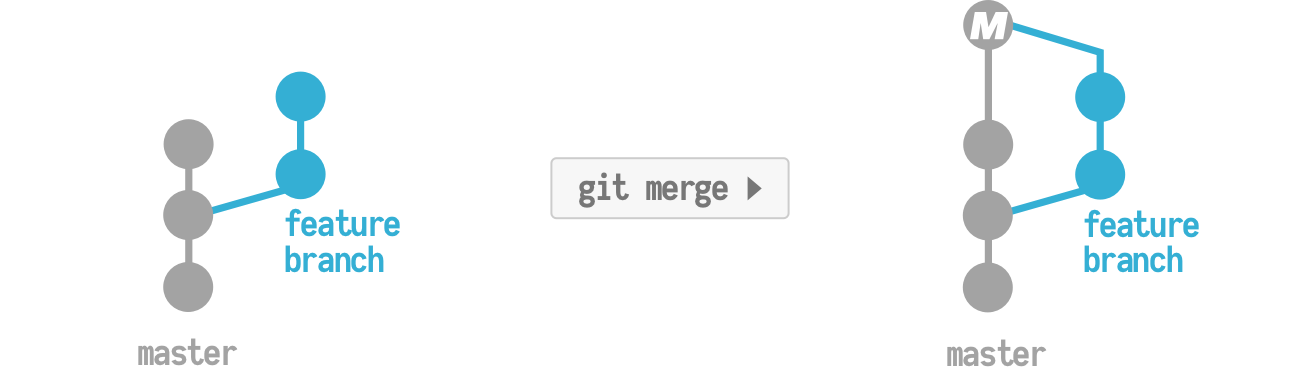
If I run a merge, git will stuff all of my changes from my feature branch into one large merge commit that contains ALL of my feature branch changes. It will then place this special merge commit onto master. When this happens, the tree will show your feature branch, as well as the master branch. Going further, if you imagine working on a team with other developers, your git tree can become complex: displaying everybody else’s branches and merges.
Rebasing
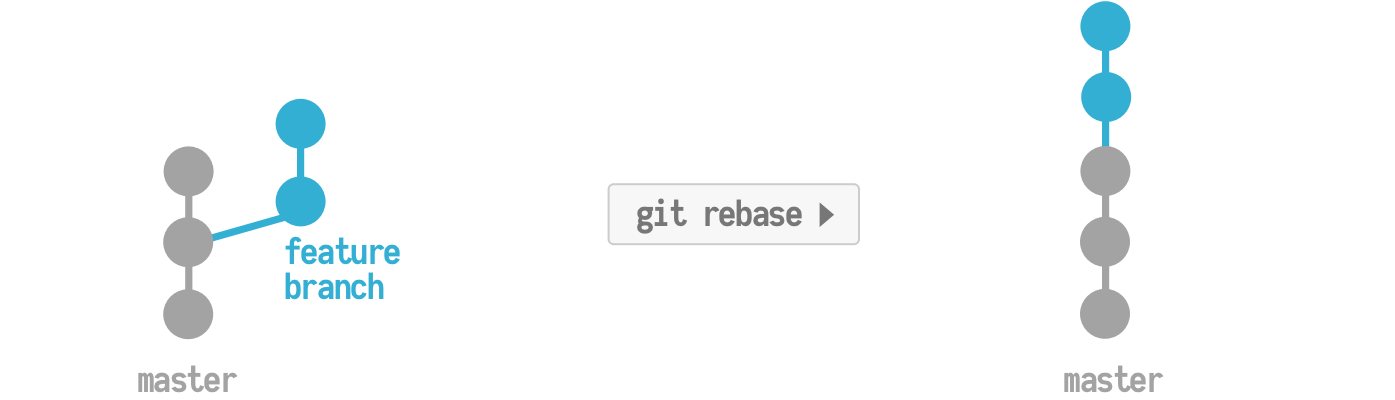
Now let’s take a look at how rebase would handle this same situation. Instead of doing a git merge, I’ll do a git rebase. What rebase will do is take all of the commits on your feature branch and move them on top of the master commits. Behind the scenes, git is actually blowing away the feature branch commits and duplicating them as new commits on top of the master branch (remember, under the hood, commit objects are immutable and immovable). What you get with this approach is a nice clean tree with all your commits laid out nicely in a row, like a timeline. Easy to trace.
Each method have positive and negative features. Each approach has to be established individually.
In practice: the actual commands
On the development team I work with, we’ve successfully adopted the workflow I’m about to show you and it works well for us. If you’d like a visual representation of what each of these commands does, check out my video.
When I start development I always make sure the code on my local machine is synced to the latest commit from remote master
# With my local master branch checked out
git fetch origin
Next, I’ll check out a new branch so I can write and commit code to this branch – keeping my work separated from the master branch
git checkout -b FeatureBranch
As I’m developing my feature, I’ll make commit.
git add .
git commit -m 'This is a new commit'
Since I synced with remote master before doing the rebase, I should be able to push my changes up to remote master without issues.
git push origin main
To save time, use aliases.


No comments:
Post a Comment